
🚀 Don't Miss This Important Resource! Our Advance Collection Of AI Tools
Explore All Tools Now !Blog posts with images get more views, shares, and engagement than text-only content. Images break up text walls, make your content more digestible, and help readers connect with your message. But how many images should you include in each blog post?
Blog posts with images get more views, shares, and engagement than text-only content. Images break up text walls, make your content more digestible, and help readers connect with your message. But how many images should you include in each blog post?
The right number of images can turn an average blog post into a reader magnet. Too few images make your content look bare. Too many can slow down your page load time and distract readers from your message.
The Ideal Number Of Images Per Blog Post
Well, the best practice is to use at least 1 image for every 350-500 words of content.
This ratio gives your content enough visual breathing room without overwhelming readers.
Images at this frequency create natural breaks in your text that keep readers engaged while complementing your written content. Your specific topic and audience will determine if you need to adjust this baseline ratio.
Factors That Affect How Many Images You Need
Blog post length directly influences how many images you should use:
- Short posts (500-800 words): 1-2 images
- Medium posts (800-1500 words): 2-4 images
- Long posts (1500-2500 words): 4-7 images
- Very long posts (2500+ words): 7+ images
Content type also matters. Some topics naturally need more visual support:
- Recipe blogs: Images for ingredients, step-by-step processes, and final results
- Travel blogs: Location photos, maps, and scenery shots
- Tech tutorials: Screenshots, diagrams, and product images
- Fashion blogs: Multiple product images from different angles
Quality Over Quantity
Using high-quality, relevant images is more important than hitting a specific number. One perfect image that illustrates your point clearly is better than three generic stock photos.
What makes a quality blog image:
- Relevant to the surrounding text
- High resolution (but optimized for web)
- Proper attribution (if required)
- Consistent style with your brand
- Contains helpful information or evokes emotion
Low-quality or irrelevant images can hurt your credibility and chase readers away. Each image should serve a purpose and add value to your content.
Strategic Image Placement
Where you place images matters as much as how many you use. Strategic image placement guides readers through your content and keeps them engaged.
Key places to add images:
- Featured image at the top of your post
- After your introduction
- Between major sections to break up text
- Near related points to illustrate concepts
- Before your conclusion to reinforce key ideas
This structure helps maintain visual flow throughout your content. Images should feel like natural parts of your article, not forced additions.
Types of Images That Work Best
Different types of images serve different purposes in your blog posts. Mix these types for the best results:
Original photography shows authenticity and builds trust. Taking your own photos gives you complete control over the message and style.
Custom graphics explain complex ideas simply. Infographics, charts, and diagrams help readers understand difficult concepts at a glance.
Screenshots prove your points with visual evidence. They’re perfect for tutorials and reviews where you need to show exactly what you’re describing.
Stock photos fill gaps when you don’t have original images. Choose ones that look natural and match your brand style.
User-generated content builds community and shows social proof. Sharing photos from customers or readers makes your content more relatable.
Image Optimization for Better Performance
More images can slow down your site if not properly optimized. Follow these best practices:
- Compress all images before uploading
- Use the right file format (JPG for photos, PNG for graphics with transparency, WebP for best compression)
- Include descriptive alt text for accessibility and SEO
- Set proper image dimensions to prevent layout shifts
- Use lazy loading so images load only when readers scroll to them
These techniques help you use more images without hurting your page speed or user experience.
Different Blog Niches and Their Image Needs
Each blog niche has different visual requirements. Here’s what works best for popular categories:
| Blog Type | Recommended Images Per 1000 Words | Image Types to Focus On |
|---|---|---|
| Business/Finance | 2-3 | Charts, graphs, business photos |
| Food/Recipe | 6-8 | Process shots, finished dish photos |
| Travel | 5-7 | Location shots, maps, activities |
| Tech/Software | 4-6 | Screenshots, product photos, diagrams |
| Fashion/Lifestyle | 7-10 | Product images, styling examples |
| Health/Fitness | 3-5 | Demonstration photos, before/after images |
This table shows that visual-heavy niches like food, travel, and fashion typically need more images than text-focused niches like business or finance.
Common Mistakes to Avoid
Many bloggers make these image-related mistakes:
Adding images just to hit a number rather than choosing ones that add value. Every image should have a purpose.
Using only decorative images that don’t provide information. Mix decorative and informational images for the best results.
Forgetting about mobile users who may see your layout differently. Test how your images appear on various screen sizes.
Not breaking up long sections of text. Even the most interested readers need visual breaks.
Inconsistent image styles that make your blog look unprofessional. Stick to a consistent visual style across all images.
Tools For Finding and Creating Blog Images
You don’t need to be a professional photographer or designer to create great blog images:
- Canva and Adobe Express for creating custom graphics
- Unsplash and Pexels for free stock photos
- Snagit and Lightshot for taking screenshots
- GIMP and other free image editors for basic editing
- Popular image compression tools for optimizing file sizes
These tools make it easier to create and maintain a library of high-quality images for your blog posts.
SEO Benefits Of Using the Right Number of Images
Images don’t just help readers—they help search engines understand and rank your content too.
Images can improve your SEO in several ways:
- Proper alt text helps search engines understand your content
- Images can appear in Google Image Search, bringing more traffic
- Visual content increases time on page, which is a positive ranking signal
- Images with proper metadata can rank for relevant keywords
However, too many unoptimized images can slow your page speed, which hurts your rankings. Balance is key.
How SEOWriting Helps Create Image-Rich Content

Creating the perfect balance of text and images takes time and effort. SEOWriting makes this process simpler with its powerful Media Hub feature. This innovative solution helps you create visually stunning blog posts without the hassle of searching for or creating images manually.
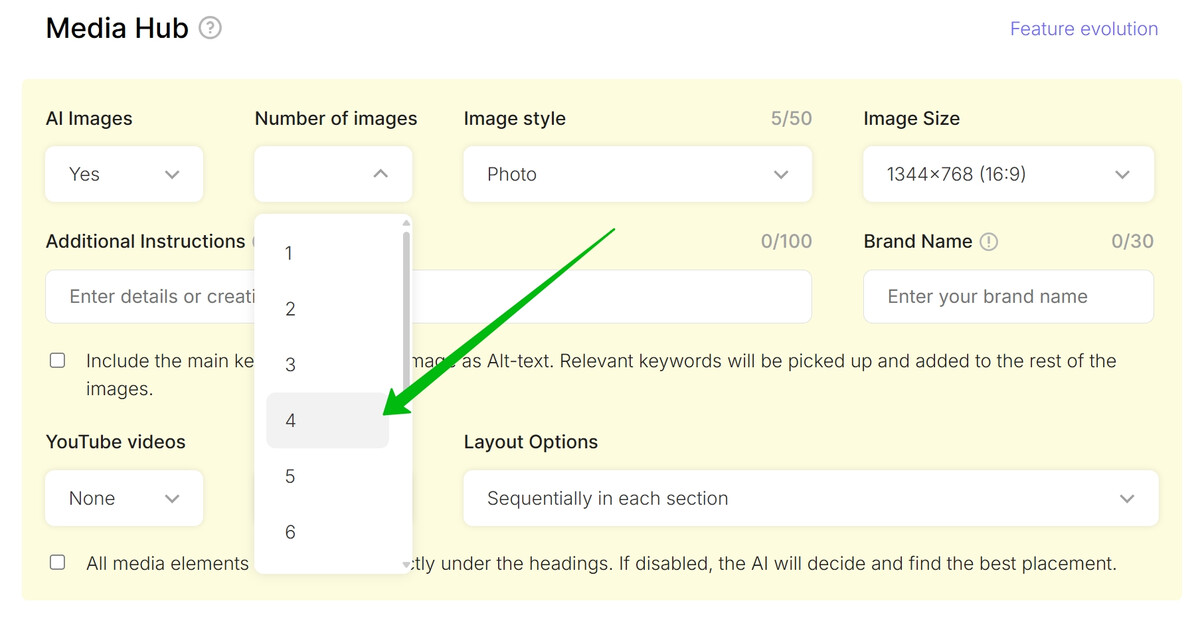
SEOWriting’s AI Image Generator automatically creates high-quality images that are relevant for your blog posts. Here’s what makes this feature valuable for content creators:
- Customizable image generation with options to select the number of images per post
- Multiple image style options including the ability to write your own style preferences
- Flexible image sizing to fit various placement needs throughout your content
- Brand integration that includes your brand name in generated images when possible
- Alt text generation for better accessibility and SEO
- Smart image distribution with options to place images sequentially in each section or distribute them evenly throughout your article
- Heading placement options that allow you to position all images directly under headings
- Image regeneration with one-click functionality if you’re not satisfied with the first result
- Prompt editing capabilities to fine-tune exactly what type of image you want
Beyond just images, SEOWriting also helps you enhance your content with relevant YouTube videos. You can choose the number of videos, their placement, and even create sophisticated layouts that alternate between images and videos in various patterns.
This integrated approach to visual content saves you hours of work while creating more engaging blog posts. The WordPress Auto-Posting feature ensures all these visual elements are properly optimized when published, maintaining fast load times despite the rich media content.
With support for 48 languages, these powerful image generation tools work seamlessly regardless of what language you publish in, making it perfect for global content creators and businesses targeting international audiences.
Final Thoughts
Finding the right number of images for your blog posts depends on your content length, topic, and audience preferences. Start with the 1 image per 350-500 words guideline, then adjust based on your specific needs.
Remember that quality always beats quantity. Choose images that tell a story, explain concepts, or evoke emotions. Each image should earn its place in your content by adding real value for your readers.